
Documentation
CodeSplash Language
Learn Spanish by sailing a chart of 28 chapters. Study one chapter per port and let FSRS spaced repetition decide what you review. Private beta, invite only.
CodeSplash Language is in private beta. Sign-in is by passkey and limited to invited accounts. Email support@codesplash.ai to ask about access.
Get started#
Open https://language.codesplash.ai and sign in with your passkey. Invited accounts are enrolled at the sign-in door, where you register a passkey with Face ID, Touch ID, or a hardware key and receive a single-use recovery code. Keep the recovery code somewhere safe. It is the only way back in if you lose every device.
After sign-in you land on the chart. The interface is in English by default. The chart toolbar on the right has zoom controls, a Study shortcut, The chapters list, a View as a list alternative to the chart, a language toggle for a Spanish interface, a theme toggle, and Settings.
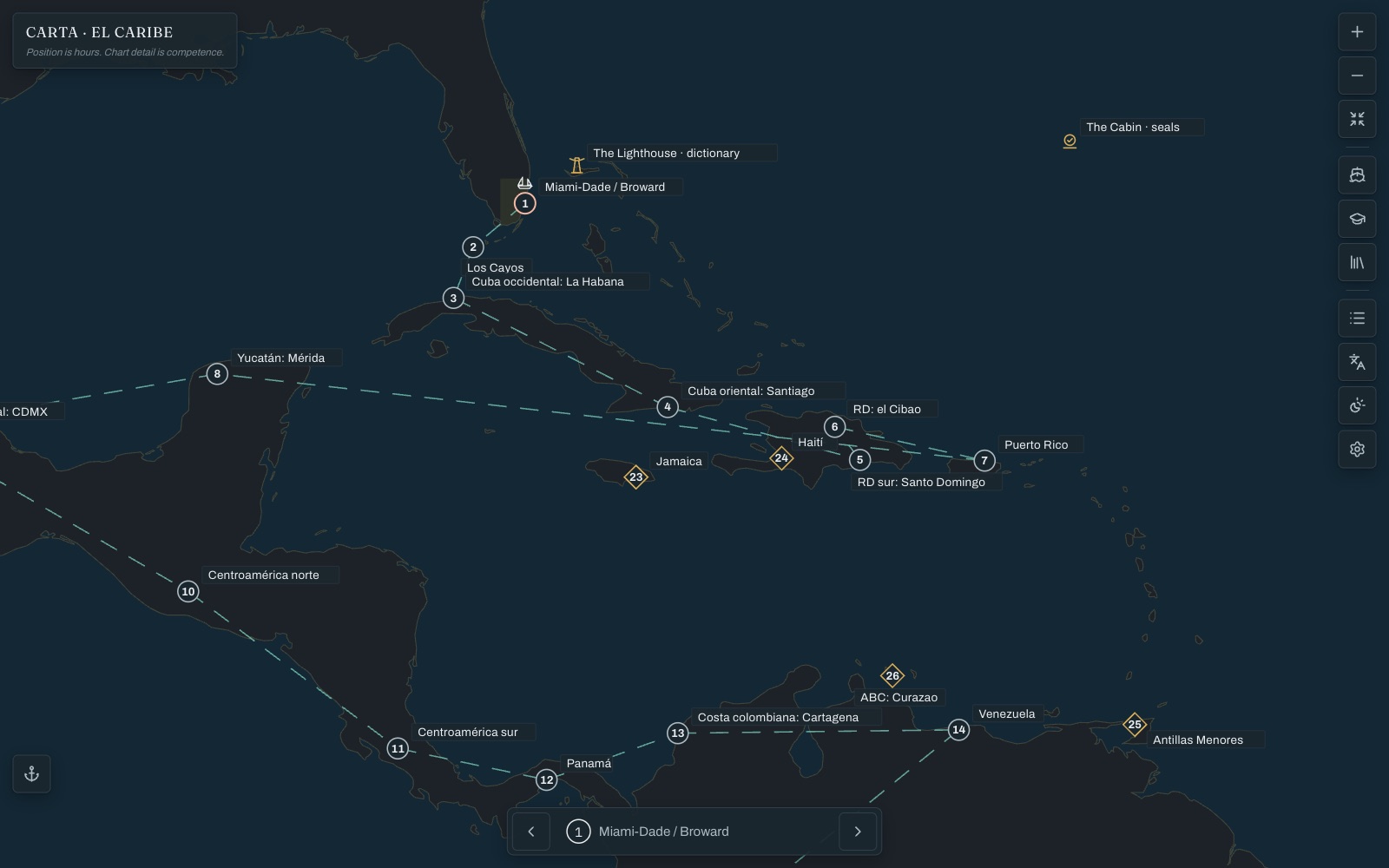
Expected result: the chart shows the Caribbean plate with Miami-Dade / Broward marked as chapter 1 and the schooner sitting on your current chapter.
Navigate la carta#
Read the chart#
Each numbered pin is a chapter. Solid circles are the main course; diamonds are bonus chapters such as Jamaica, Haití, Antillas Menores, and ABC: Curazao. Two fixed landmarks sit on the chart: The Lighthouse opens the dictionary and The Cabin opens your sellos.
Zoom with the plus and minus buttons or the mouse wheel, and use Fit the plate to reset the view. The chapter stepper at the bottom moves between chapters without leaving the chart.
Follow the course, or not#
The recommended course runs Miami, Los Cayos, Cuba, the Dominican Republic, Puerto Rico, then Mexico, Central America, South America, and on to Madrid and El Estrato. It is only advice. Nothing on the chart is locked, so you can open any chapter at any tier at any time.
Switch to the list#
The chapters shows the same course as a list, with each chapter's tense, theme, and number of sayings. The current chapter is highlighted with a note that the schooner is here.
Study a chapter#
The chapter tabs#
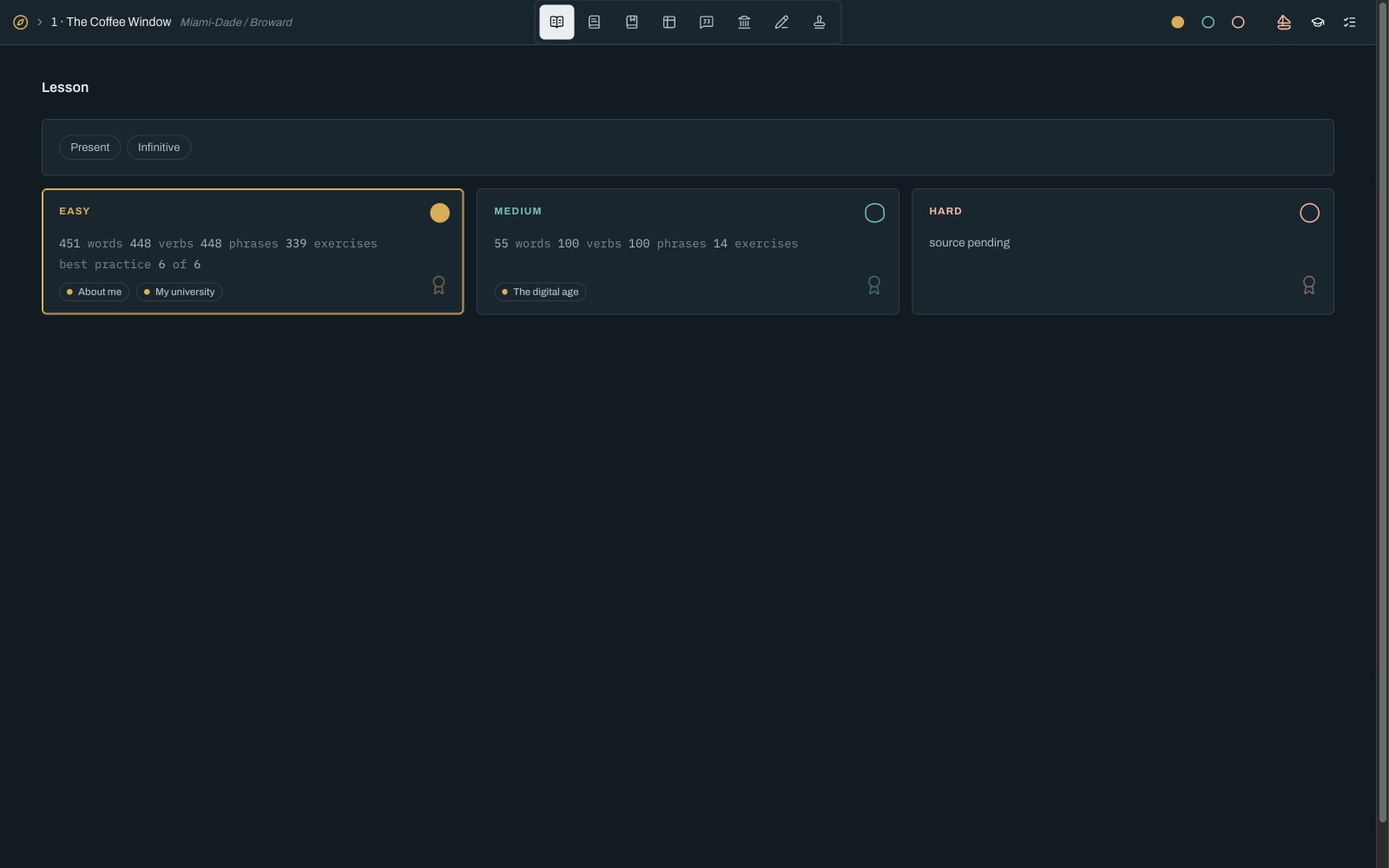
Every chapter page has the same sections across the top: Lesson, The book, Vocabulary, Verbs, Phrases, History, Exercises, and Exam. A difficulty control on the right switches between easy, medium, and hard.
Pick a tier#
The Lesson tab lists what each tier contains. The easy tier of chapter 1, The Coffee Window, covers the present tense with themes such as About me and My university. Medium adds a new theme and the hard tier appears when its source textbook is ready. Start where you still feel confident and move up when the exam agrees.
Vocabulary, verbs, and phrases#
Vocabulary, Verbs, and Phrases are card decks grouped by theme. Move through cards with the arrows, shuffle the deck, or open the list view to see everything at once. The Verbs deck opens full conjugation tables for each verb, from non-finite forms through every indicative and subjunctive tense.
Exercises#
The Exercises tab holds the playable textbook drills for the chapter: Matching, Cloze, and Verbs. Your best score on each set is shown beneath the drill.
History#
Each chapter carries a short history lesson about its place and the dialect feature of that region.
Daily session#
Start a session#
- Open Study from the chart toolbar.
- Review the plan for today. The page shows how many cards are queued, the estimated time, and which chapter and tier they come from.
- Tap Start.
Expected result: the session opens on its first card with a progress counter and a timer at the top and an Exit link on the right.
Triage a new word#
When a word enters the queue for the first time the app asks whether you already know it. Pick one of three answers: I can produce it instantly, I recognize it, can't produce it, or I don't know it. Your answer sets the starting point for that word's schedule, so words you already own do not clog the queue.
Four memory states#
Each card is scheduled separately for four states: recognizing the word, decoding it by ear, recalling it in writing, and producing it aloud. Knowing a word on sight does not hide that you cannot say it, and reviews target the weak state.
Finish or exit#
Complete the queue or tap Exit at any time. Progress is saved as you go.
Exams and sellos#
Chapter exams#
The Exam tab on each chapter assembles a fixed exam from that chapter's bank at the tier you choose. Exams can be retaken whenever you like.
Earn sellos#
Passing a chapter exam stamps a sello for that tier. The Cabin on the chart, or Profile, The sellos, shows every chapter with its easy, medium, and hard seals. Seals are computed from the exam log, so they are earned as evidence and never handed out.
El Examen General#
The overall exam draws across the whole course and produces a single score from 0 to 100.
Your data#
Where it lives#
Your study history, exam attempts, and passkeys are stored in a Postgres database in the US East region and backed up daily to private storage for 30 days. Sentences are read aloud by Azure Speech from the app's own content. Nothing you type is sent to Azure. There are no analytics and no AI model at runtime.
Export a backup#
Your cards, reviews, and exam attempts can be exported as a single versioned JSON file from the app's backup export.
Delete your account#
There is no self-service deletion yet. Email support@codesplash.ai with the subject Data Deletion Request and we will remove your account, study history, and passkey credentials.
Troubleshooting#
I cannot sign in#
Sign-in is limited to invited accounts. If you have an account, use the passkey you registered or the recovery code you were given. If both are gone, email support@codesplash.ai.
The chart shows a "route is not on the chart" message#
You opened an address that is not a surface in the app. Use Back to the chart to return home.
Audio does not play#
Check that your browser allows sound for language.codesplash.ai. Audio is generated on first request and then cached, so the first play of a sentence can take a moment.
The interface is in Spanish#
Use the language toggle in the chart toolbar to switch back to English. The choice is remembered per browser.
Frequently asked questions#
Can I sign up?#
CodeSplash Language is in private beta and sign-in is by invitation. Email support@codesplash.ai to ask about access.
Does it use AI?#
No language model writes a Spanish sentence or grades an answer. Content comes from openly licensed textbooks and real example sentences with attribution. Spoken audio uses neural text-to-speech voices with Caribbean accents.
Is there a mobile app?#
CodeSplash Language is a web app you can install to your home screen on iPhone, iPad, or desktop. There is no App Store app.
What does it cost?#
It is free while in private beta. Pricing has not been decided.
Where do I get help?#
Email support@codesplash.ai.