Documentation
CodeSplash Surgery
A clinical web and iPad app for hospital surgical teams. Patient lists by unit and status, encounter records with clinical form tabs, a form builder, scheduled PROM collection, implant tracking, and risk badges from an external ML service.
CodeSplash Surgery is live at surgery.codesplash.ai. Hospitals join through a pilot program. Screenshots show fictional patients.
Overview and roles#
CodeSplash Surgery follows a surgical patient from the day surgery is proposed through PACU, the inpatient stay, discharge, ER visits, and readmission. Each hospital visit is an encounter, and each encounter carries the clinical forms your team defines.
Five roles shape what a user sees: admin, physician, nurse, data collector, and read-only. Admin screens (users, forms, lookups, implants, dashboard) live in the web app. Patient lists, records, forms, PROMs, and barcode scanning are available on the web and in the native iPad and iPhone app.
There is no self-service registration in production. Administrators create staff accounts and assign each person a facility and one or more units.
Patient lists#
Browse by unit and status#
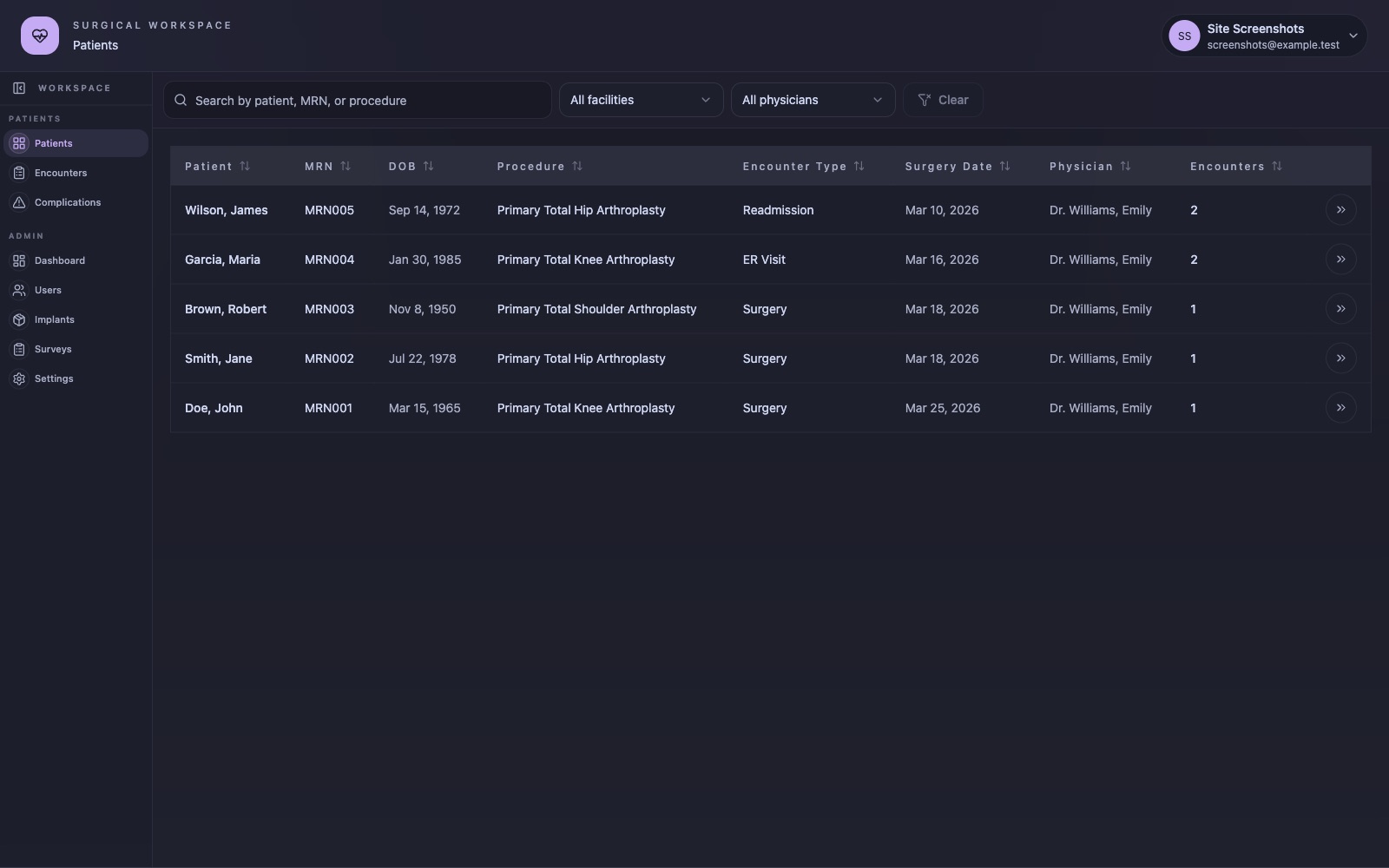
The Patients screen lists patients across the units you are assigned to. Lists exist for every stage: Proposed, Surgery, PACU, Inpatient, Outpatient, Discharged, ER Visits, and Readmissions.
Search, filter, and sort#
Search by patient name, MRN, or procedure. Filter by facility and by physician, and sort any column: Patient, MRN, DOB, Procedure, Encounter Type, Surgery Date, Physician, and Encounters. Clear resets the filters.
Open a record#
Click a row to open that patient's most recent encounter.
Expected result: the encounter workspace opens with the patient's header, procedure, assigned clinician, and the form tabs for that encounter.
Patient record and encounters#
The encounter header#
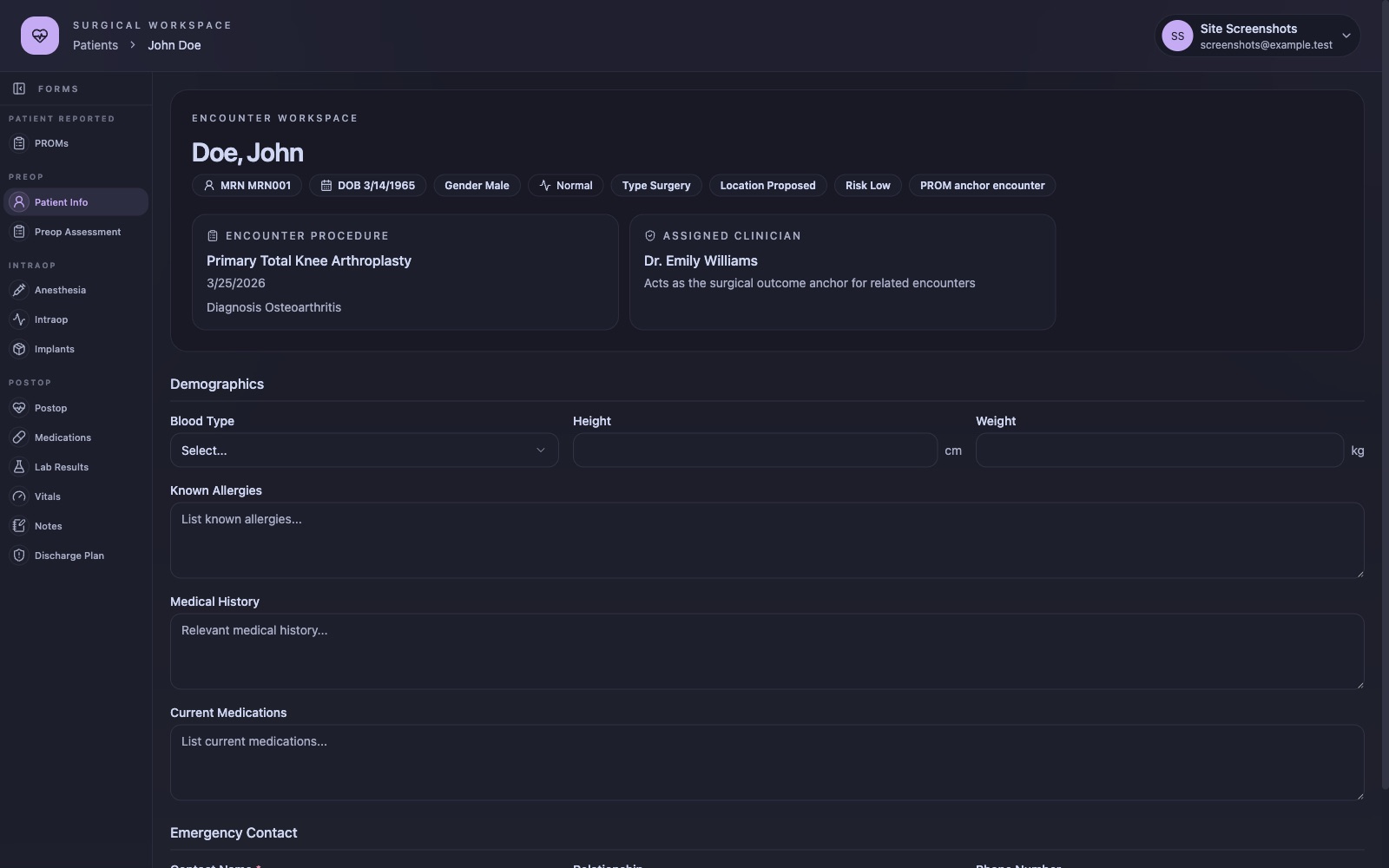
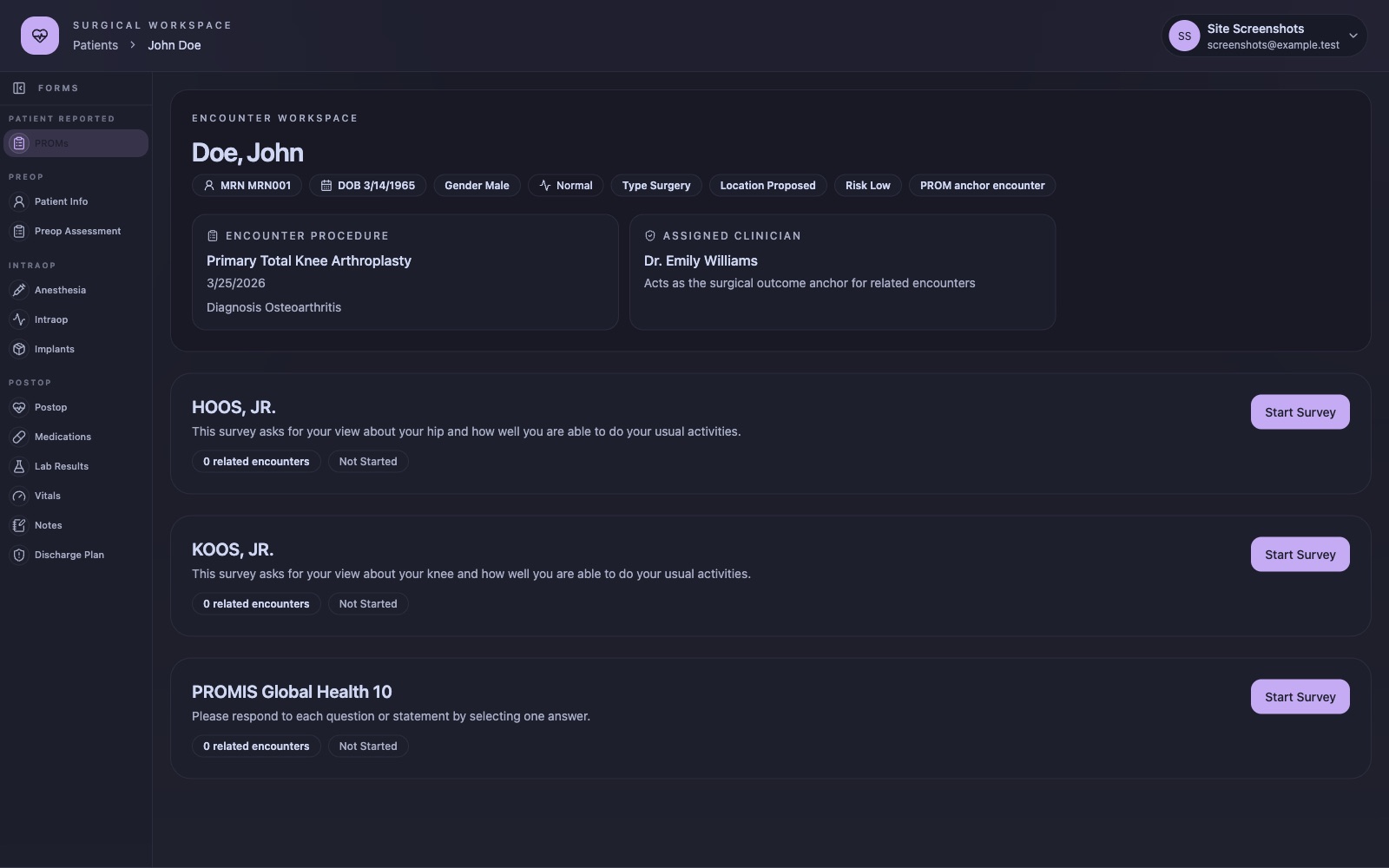
The header shows the patient's MRN, date of birth, gender, current status, encounter type, location, and risk level, plus the procedure, its date, the diagnosis, and the assigned clinician. One encounter per patient is marked as the PROM anchor encounter, which drives the outcomes schedule.
Encounter history#
A patient can have many encounters. Readmissions and ER visits are recorded as their own encounters and linked back to the surgical anchor.
Change status#
Encounter status moves the patient between lists as care progresses, for example from Proposed to Surgery to PACU to Inpatient to Discharged.
Clinical forms and the form builder#
Fill a form#
The left rail of the encounter workspace groups forms by phase: Patient Reported (PROMs), Preop (Patient Info, Preop Assessment), Intraop (Anesthesia, Intraop, Implants), and Postop (Postop, Medications, Lab Results, Vitals, Notes, Discharge Plan). Answers save to the encounter as you complete each form.
Build a form#
- Open Surveys under Admin and choose a form, or create a new one.
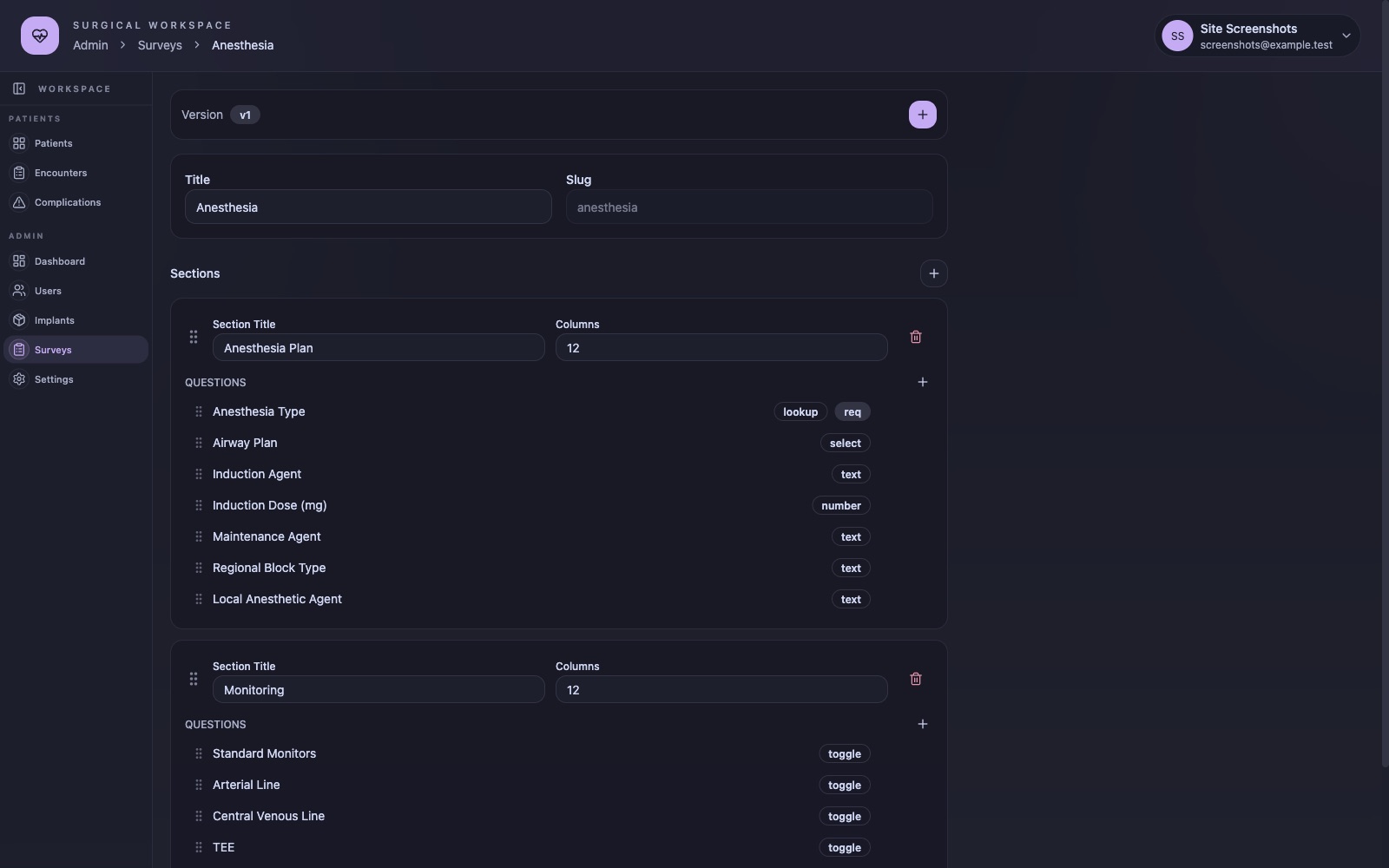
- Set the title and slug. Each saved change creates a new version, and the active version is shown at the top.
- Add sections. Each section has a title and a column count for layout.
- Add questions to a section and pick a type. There are 19 question types, including text, number, select, lookup, toggle, date, vital signs, pain scale, and medications.
- Drag the handle beside a section or question to reorder it.
- Mark questions as required and add show or hide rules that depend on other answers.
Expected result: the new version appears on encounters immediately, and earlier responses stay attached to the version they were answered on.
Lookup lists#
The Lookups tab beside form definitions holds the shared option lists that lookup questions draw from, so choices stay consistent across forms and units.
PROMs#
Instruments#
Three patient-reported outcome instruments are built in: HOOS JR. for hips, KOOS JR. for knees, and PROMIS Global Health 10.
Schedule#
PROMs are collected at baseline, 6 weeks, 6 months, and 1 year around the anchor encounter. The PROMs tab shows each instrument's status and the related encounters it has been collected on.
Collect on an iPad#
The flow was designed for nurse-administered collection on an iPad at the visit. Open the patient's record in the iOS app, choose the instrument, and hand the device to the patient. Tap Start Survey on the web to do the same at a desk.
Implants#
Scan a device#
On the Implants form in the iOS app, scan the device barcode with the camera or type it in. On the web, enter the barcode manually.
Look up unknown devices#
If a device is not in your implant catalogue, the app looks it up in the FDA AccessGUDID database and records the result. Only the device identifier is sent.
Manage the catalogue#
Implants under Admin lists every device your hospital has recorded, with the ability to edit entries and review the scan log.
Risk signals#
An external machine-learning service can post complication, readmission, and ER-visit risk for an encounter using an API key. When a signal is present the record shows a risk badge in the header. The app does not compute risk itself and shows nothing when no signal has been received.
Admin#
Users#
Create staff accounts, assign a role, a facility, and units, and deactivate accounts when people move on. Accounts are deactivated rather than deleted.
Activity log#
Each request records the user, action, path, status, IP address, and browser, for review by administrators.
Dashboard and settings#
The dashboard summarises unit activity. Settings hold theme and display preferences.
iOS app#
The native SwiftUI app runs on iPad and iPhone with iOS 18 or later. It covers sign-in, every patient list, search and filters, patient and encounter create and update, status changes, native rendering of the workspace forms, PROM collection, implant scanning with the camera, and ML signal display. Admin screens stay web-only. The app is not on the App Store and is distributed to pilot sites directly.
Data and compliance#
Where data lives#
The API runs on NestJS with a PostgreSQL database, deployed on infrastructure the hospital controls. Staff passwords are hashed with bcrypt.
What leaves the system#
Implant lookups send device identifiers to the FDA AccessGUDID service. An external ML service may post risk scores in. There are no analytics, no crash reporting, and no language models.
Pilot requirements#
A hospital pilot requires a signed Business Associate Agreement and a completed security review before patient information is entered. Screenshots on this site use fictional patients.
Frequently asked questions#
Is CodeSplash Surgery available?#
Yes. It is live at surgery.codesplash.ai. Hospitals join through a pilot program. Email support@codesplash.ai to start the conversation.
Can I try it?#
Sign-in is limited to pilot hospitals. Pilot sites start with sample data before any patient information is entered.
Does it replace the hospital EHR?#
No. It is a focused surgical registry and outcomes tool that sits beside the EHR.
Where do I get help?#
Email support@codesplash.ai.